
Geometry Dash Font Generator
Create arcade pixel text effects inspired by Geometry Dash
⚠️ Theme fonts are loading... Using fallback fonts temporarily.
About Geometry Dash Font Generator
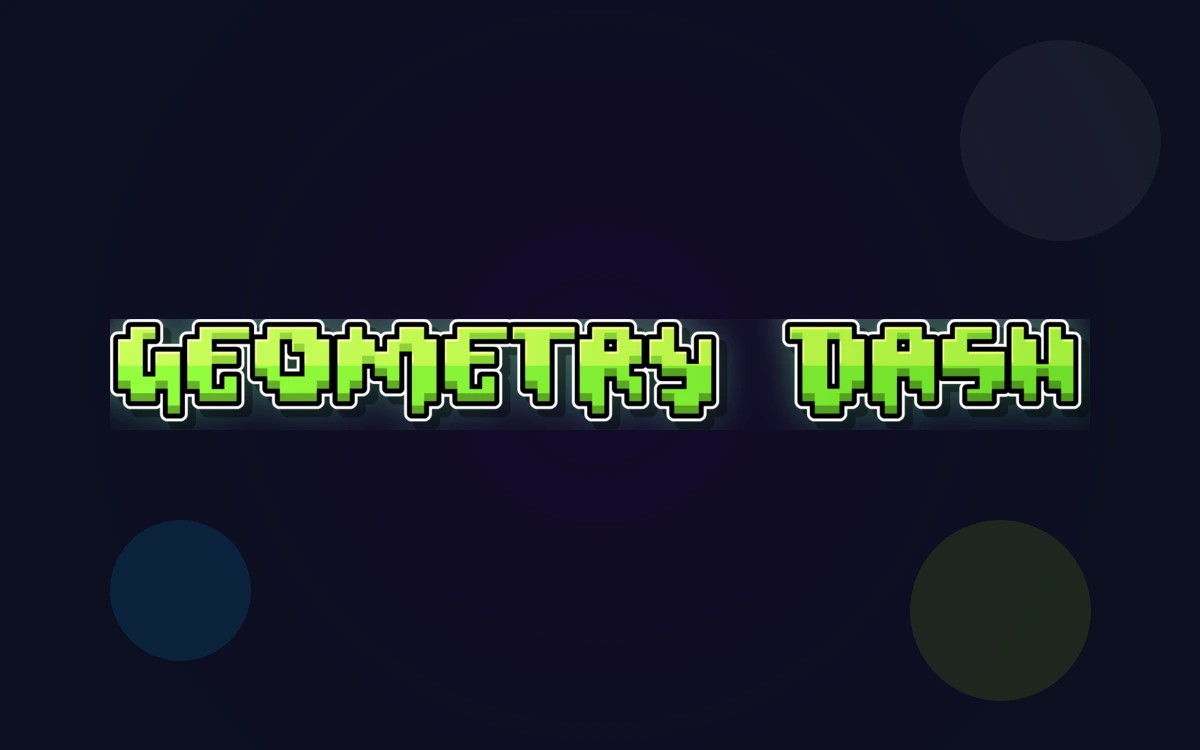
Neon pixel styling inspired by Geometry Dash
Geometry Dash is known for its bold, blocky title lettering and playful bubble-style UI text. The logo style is commonly associated with the Oxygene 1 pixel font, while in-game bubble text is often matched with Pusab. This generator brings that high-contrast, neon arcade vibe to your own banners, thumbnails, and game-themed graphics.
Fonts Used
Oxygene 1
Family: Oxygene 1
A pixel display font commonly associated with the Geometry Dash logo style.
Pusab
Family: Pusab
A rounded, bubbly font often used to match Geometry Dash in-game text.
Font Generator Tools
Preview & Download
Text Settings
Tip: Use two lines (for example: TOY + STORY) to mimic stacked logo layouts.
Style Tools
Preset Styles
Text Effects
Quick Actions
Background Tools
Background Color
Background Image
Upload Background Image
Drag image here or click to select file
Explore More Font Generators
Discover other amazing font generators to create stunning text effects for any theme or style
The Life Of A Showgirl Font Generator
Create sophisticated text effects with Gazzetta Slanted typography inspired by theatrical performance and artistic elegance
Toy Story Font Generator
Create Toy Story style title text with Willy (TOY) and Rumble (STORY) replica fonts
Squid Game Font Generator
Create text effects with authentic Squid Game poster fonts
Harry Potter Font Generator
Create magical text effects with authentic Harry Potter movie fonts
Stranger Things Font Generator
Create retro 80s text effects with authentic Stranger Things style
Ozzy Osbourne Font Generator
Create legendary heavy metal text effects with authentic Ozzy Osbourne style fonts
Frequently Asked Questions
Find answers to the most common questions about our font generator
This tool recreates the visual style inspired by Geometry Dash fonts. It is not an official font released by the game.
How to Create Geometry Dash Text
Follow these steps to build sharp, neon arcade text effects.
Enter Your Text
Type your title, level name, or short phrase. Shorter text works best for the bold pixel look.
Pro Tips:
- •Use ALL CAPS for the most authentic feel
- •Keep it 2-4 words
- •Numbers and symbols are supported
Pick a Preset
Choose a neon preset like Cube Blue or Neon Lime to match the Geometry Dash vibe.
Pro Tips:
- •Blue and lime are classic arcade colors
- •Magenta adds energy
- •Yellow pops on dark backgrounds
Adjust Glow & Stroke
Fine-tune shadow and outline to make the text stand out on busy backgrounds.
Pro Tips:
- •Strong stroke improves readability
- •Soft glow adds depth
- •Dark backgrounds enhance contrast
Export Your Design
Download a high-quality PNG ready for thumbnails, banners, or level art.
Pro Tips:
- •PNG keeps the glow crisp
- •Use transparent backgrounds when layering
- •Test legibility at small sizes