
Toy Story Font Generator
Create Toy Story style title text with Willy (TOY) and Rumble (STORY) replica fonts
⚠️ Theme fonts are loading... Using fallback fonts temporarily.
About Toy Story Font Generator
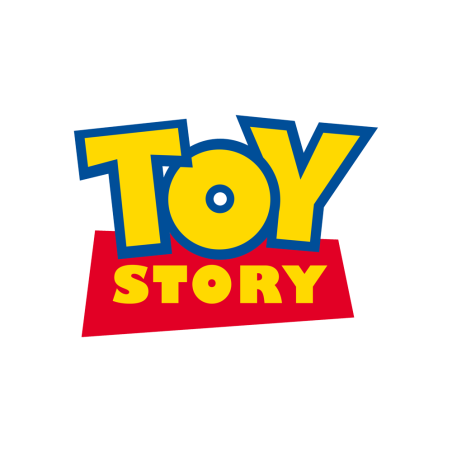
Toy Story style stacked lettering: Willy for TOY and Rumble for STORY
Toy Story is Pixar's landmark animated franchise with one of the most recognizable logo treatments in pop culture. A close fan-made replica is often built with two fonts: Willy for the top word "TOY" and Rumble for the bottom word "STORY". This generator is tuned for that stacked title look, combining bold outlines, bright yellow-blue contrast, and punchy cartoon shadows for memes, invitations, and social graphics.
Fonts Used
Willy
Family: Willy
Best-known fan replica for the top word "TOY" in Toy Story style logos.
Rumble
Family: Rumble
Best-known fan replica for the bottom word "STORY" with heavy rounded forms.
Font Generator Tools
Preview & Download
Text Settings
Tip: Use two lines (for example: TOY + STORY) to mimic stacked logo layouts.
Style Tools
Preset Styles
Text Effects
Quick Actions
Background Tools
Background Color
Background Image
Upload Background Image
Drag image here or click to select file
Explore More Font Generators
Discover other amazing font generators to create stunning text effects for any theme or style
The Life Of A Showgirl Font Generator
Create sophisticated text effects with Gazzetta Slanted typography inspired by theatrical performance and artistic elegance
Squid Game Font Generator
Create text effects with authentic Squid Game poster fonts
Harry Potter Font Generator
Create magical text effects with authentic Harry Potter movie fonts
Stranger Things Font Generator
Create retro 80s text effects with authentic Stranger Things style
Geometry Dash Font Generator
Create arcade pixel text effects inspired by Geometry Dash
Ozzy Osbourne Font Generator
Create legendary heavy metal text effects with authentic Ozzy Osbourne style fonts
Frequently Asked Questions
Find answers to the most common questions about our font generator
Yes. The generator is free for personal use scenarios such as fan content, mockups, and social posts.
How to Use Toy Story Font Generator
Follow these steps to create clean, playful Toy Story style text graphics in minutes.
Enter Your Text
Type your headline with a line break, such as "TOY" on line 1 and "STORY" on line 2.
Pro Tips:
- •Use all-caps for a classic logo feel
- •Keep each line short
- •Two lines work best for Toy Story replicas
Pick a Preset Style
Choose from logo-inspired presets like Logo Replica, Buzz Ranger, and Woody Badge.
Pro Tips:
- •Logo Replica is best for title cards
- •Buzz Ranger is ideal for playful hero text
- •Woody Badge works well for warm/red visuals
Set Line Fonts
Enable Dual-Line Font Mode, then set line 1 to Willy and line 2 to Rumble.
Pro Tips:
- •Use Willy for the top word
- •Use Rumble for the bottom word
- •Adjust line 2 scale for better logo balance
Export and Share
Download your final graphic and publish it on social media, videos, or invitations.
Pro Tips:
- •Use high resolution for print
- •Use transparent background when needed
- •Test on mobile before posting